
Copyright (c) 2023, Intercom, Inc. (
[email protected]) with Reserved Font Name "Montserrat". This Font Software is licensed under the SIL Open Font License, Version 1.1.Copyright (c) 2023, Intercom, Inc. (
[email protected]) with Reserved Font Name "Inter". This Font Software is licensed under the SIL Open Font License, Version 1.1. Table of contents Upload Photos Directly to the Photos Page in a Project


Organize all of your project's photos by uploading directly to the Photos page in Pegasus
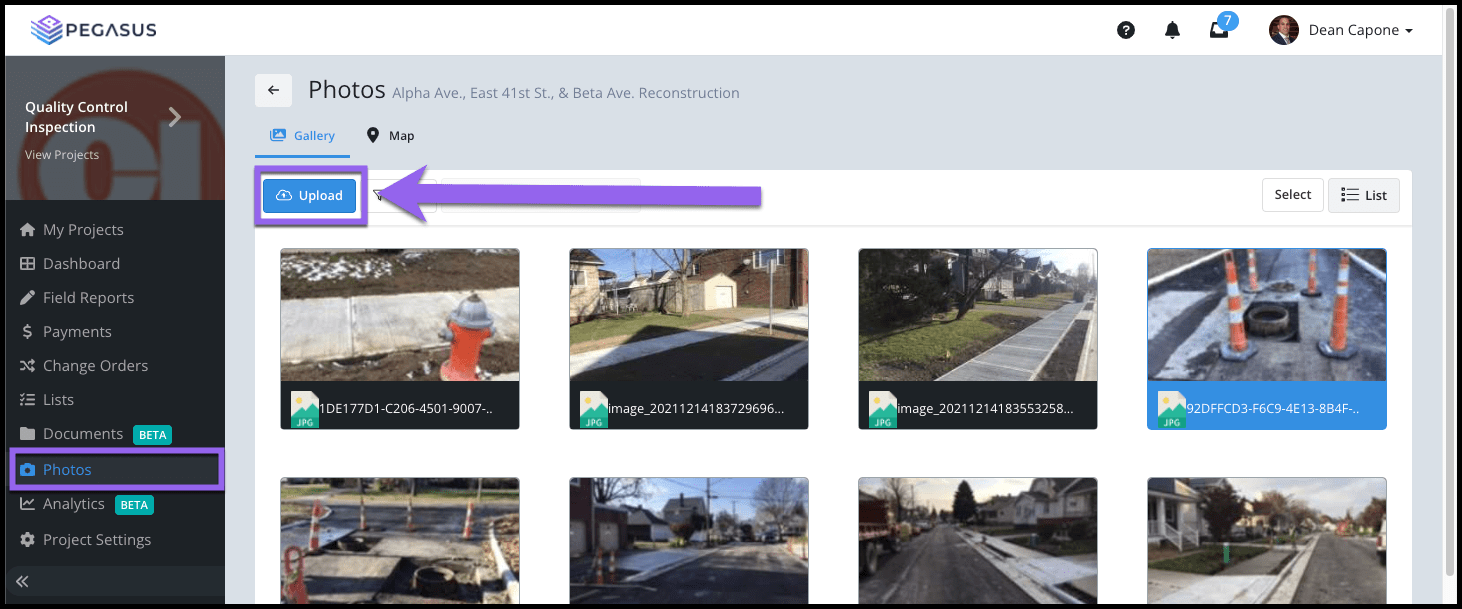
Updated over 2 years ago Table of contentsNavigate to your project's Photos page.
Select the Upload button.

Select the Photo(s) you want to upload from your device's file browser.

Your Photo will now display in the Gallery view of the Photos page.

Select the thumbnail image to view it enlarged with additional information. The origin will display as Photos, this indicates the image was uploaded directly to the Photos page.

Photos uploaded to the Photo gallery can also be removed or deleted, if necessary. These are the only types of photos that can be deleted since they do not belong to a parent record (Approved Report or Document) in Pegasus.